Your reliability score
Your reliability score is one number, from 0 to 10, attached to your account. It follows you across the whole platform — the website and the Telegram bot, and every product: Paid Promotions, Cross-Promotion, Boost, the Subscriber Exchange. It is how the other side of a deal knows they can trust you, and it decides what you are allowed to start, how far your ads reach, and what you pay.
See yours any time at https://onflowads.com/telegram/dashboard/reliability — it is also the shield pill in the header on every page. Everyone starts at a neutral 8.0: trusted from day one, with room to climb and room to slip.
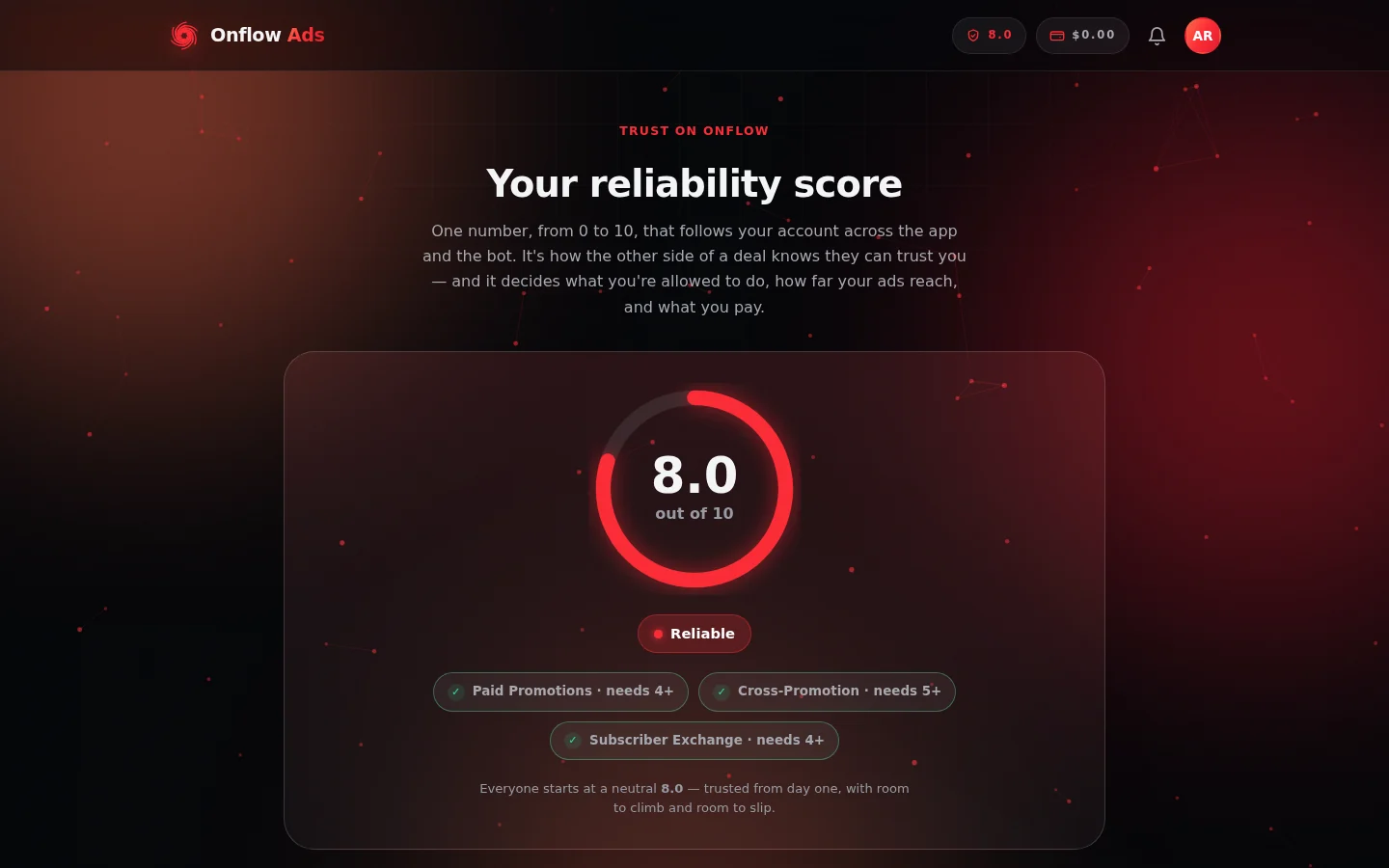
The top of your reliability page: the score dial, the tier it falls in, and a chip per product showing the score that product asks for — ticked when you clear it.
This page is a tour of the reliability page itself. The complete published rules — every penalty amount, every credit, the automatic healing schedules, and the recovery limits — live on the "Your reliability score" page in the Policies section of this guide. The same tables are shown live on your reliability page, which is always the authoritative view of the current values.
What the page shows
The reliability page is built from a handful of panels, top to bottom:
- Your score and tier — the big number, with the tier band it falls in.
- The rulebook — the current penalty and credit tables (fixed, published amounts — nothing moves your score by surprise, and penalties fire only on confirmed outcomes).
- The product floors — the minimum score each marketplace requires to start something new.
- Your ledger — every change ever made to your score, with reasons and appeal buttons.
The tiers
| Score | Tier | What it means |
|---|---|---|
| 9.0–10 | Trusted | Top ranking, lowest fees, full reach, extra AI allowance |
| 7.5–8.9 | Reliable | A strong, dependable record — full reach, no fee surcharge above 8.0 |
| 5.0–7.4 | Fair | Good standing — cross-promotion stays open; reach reduced |
| 4.0–4.9 | Building | Paid promotions open; cross-promotion locked; reach reduced further, AI throttled |
| 0–3.9 | Low | Marketplaces locked — rebuild before starting new deals |
Where the floor stops you
Each product has a minimum score to start something new. Below the floor, that surface locks until you recover — but anything already in flight always finishes. The exact floors are shown live on your reliability page; as displayed there:
- Paid Promotions — needs 4.0 or higher, for advertisers and channel owners alike.
- Cross-Promotion — needs 5.0 or higher. The community bar is higher because both sides trade audience with no money in escrow.
- Subscriber Exchange — needs 4.0 or higher to join as a host.
If you try to start a deal below a floor, the block message tells you your current score, the floor, and points you to the reliability page.
Under Review
While a fraud concern about you is being investigated — or your wallet is frozen — your score displays as Under Review and you cannot start a new deal on any surface until it clears. Deals already in progress still finish. The score is frozen in the meantime so it cannot be used against you unfairly mid-dispute, and it neither heals nor drops until the concern is resolved.
How the score moves — the short version
- Up: finish deals cleanly. Each clean completion credits your score immediately (owners earn a larger credit than advertisers). Above 9.0, each completion is worth steadily less — no one can farm a permanent 10 — and self-dealt completions earn nothing.
- Down: only on confirmed failures — ghosting a request, not posting in the window, pulling a post early, upheld fraud, false disputes, and similar. Every penalty has a fixed, published size.
- Back up after a drop: three routes — earn it back with clean deals, let a clean streak heal it automatically, or appeal a mark you believe is wrong.
The full tables — exact amounts, healing speeds and their limits — are in the Policies section and on your reliability page itself.
Reading your ledger
The Your ledger section at the bottom of the reliability page lists your most recent changes (up to the last 50 entries): the amount (green for credits, red for penalties), a plain-language label, the date, and your score after the change — plus recovery credits, restorations and admin adjustments. Nothing moves your score without a line here.
Labels you may see include, among others: Clean delivery, Clean campaign, Clean-streak recovery, Ignored a request, Did not post in the window, Post removed early, Fraud concern upheld, Abandoned a deal, Restored — not at fault, Forgiven, and Admin adjustment.
Each entry also carries its appeal state on the right:
- an Appeal button — the penalty stands and you have not contested it yet,
- Appeal under review — you contested it and the team is looking,
- Reversed — the penalty was overturned and its exact points restored.
If nothing has happened yet, the ledger simply says "No activity yet — your score sits at the neutral 8.0 until you complete deals."
Appealing a penalty — step by step
If a mark on your ledger should not be there, you can contest it directly from the page. Every appeal is reviewed by a human on the team — you can never remove a ledgered penalty yourself, and appealing is exactly how you ask.
- Open https://onflowads.com/telegram/dashboard/reliability and scroll to Your ledger.
- Find the penalty and click its Appeal button. Only entries that can be appealed show one: the entry must be a penalty (a negative amount) that still stands — not already reversed, and not already appealed.
- A dialog asks: "Briefly, why do you think this penalty is wrong?" Write a short explanation — up to 500 characters — and confirm. Leaving it empty cancels; a reason is required.
- The entry immediately switches to Appeal under review. That is your receipt: the team has it.
Possible outcomes
- Appeal upheld — the penalty is overturned. The exact points it took are restored, and the entry is tagged Reversed. A genuine restore can even carry you back above the usual recovery ceiling, because it returns standing you had already earned. A forgiven mark also stops slowing your clean-streak healing — it no longer counts against you at all.
- Appeal declined — the mark stands. You get a notification — "Your appeal was reviewed" — pointing you back to the reliability page, and the Appeal under review tag clears. You can still recover the points the ordinary ways: clean completions and the clean-streak healing schedule.
Rules and edge cases
- One open appeal per entry. While your appeal is under review, trying again shows "You've already appealed this — our team will review it."
- Already-reversed penalties cannot be appealed — "That penalty was already reversed — nothing to appeal."
- Credits and restorations cannot be appealed — only negative marks can ("That isn't a penalty you can appeal.").
- Appeals do not freeze anything: while the review runs, your score, gates and healing behave exactly as they did.
What a low score costs — beyond the gates
Even above every floor, the score keeps working quietly in the background: it lifts (or sinks) your marketplace ranking, scales your ad reach below the Reliable band, can add a small commission surcharge for owners below 8.0, and caps your AI allowance. The exact multipliers and rates are published in the Policies section and shown on the reliability page.
FAQ
Someone falsely accused me of fraud — will the penalty stick?
Penalties fire only on confirmed outcomes. An accusation alone does not mark your ledger; it opens a review (during which your score may show Under Review). If the concern is rejected, the accuser — not you — takes the "false dispute" consequence. If a penalty does land and you believe it is wrong, appeal it from the ledger.
How long do appeals take?
Every appeal is read by a human, so there is no fixed clock. The entry shows Appeal under review the whole time, and the outcome appears right on the ledger — Reversed if upheld.
Why is there no Appeal button on my entry?
Either the entry is a credit (only penalties can be appealed), it was already reversed, or you have already appealed it — an entry can only be contested once.
Next: FAQ & troubleshooting — quick answers for everything in this section.