Cross-Promotion Overview
Cross-promotion is Onflow Ads' free growth tool for Telegram channel owners. You pair up with another channel, agree a go-live time, and each channel carries the other's promotional post for an agreed run. No money changes hands — you trade reach, not budget.
Once both of you have written and approved each other's posts, our bot publishes both posts automatically at go-live and removes them at the end of the run. You get real results afterwards: how many people opened each ad, proof links to the live posts, and subscriber-gain numbers.
Everything starts from the Cross-Promotion hub in your dashboard.
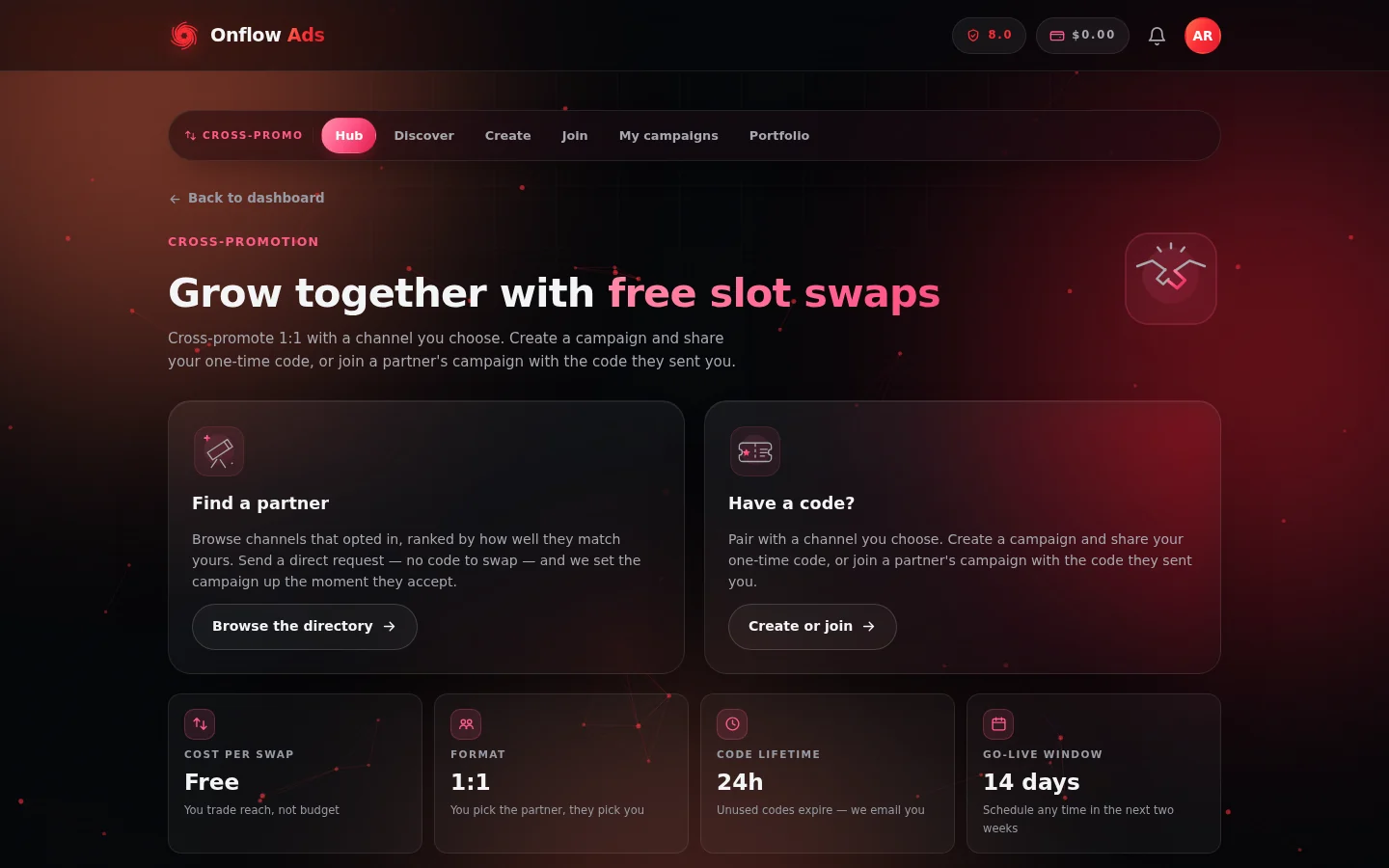
The Cross-Promotion hub. The pill strip along the top — Hub, Discover, Create, Join, My campaigns and Portfolio — is how you move between every cross-promotion flow.
Who it is for
- Channel owners who want to grow their audience without spending on ads.
- Creators with several channels — the Portfolio page lets you run cross-promotion across your whole roster.
- Any public Telegram channel. Private channels cannot be cross-promoted.
The two ways to pair up
| Route | How it works | Start here |
|---|---|---|
| Find a partner | Browse the opt-in partner directory, ranked by how well each channel matches yours. Send a direct request — no code needed — and the campaign is set up the moment they accept. | Discovering partners and Partnership requests |
| Have a code? | Create a campaign and get a one-time code like CP-7K4M-Q2XP to hand to a partner you already know — or enter the code a partner sent you. | Manual promos with CP codes |
There is also an open-campaigns board: creators can list an unclaimed campaign publicly so any well-matched member can find and join it without being sent the code privately. See Discovering partners.
How a swap runs, end to end
- Pair up — via a code, a directory request, or the board.
- Agree the schedule — the joiner accepts the proposed go-live as-is, or proposes new timing for the other side to approve. See Schedule proposals.
- Build your posts — each of you writes the promo that will run in the other's channel (text plus optional link buttons). See Creatives.
- Review each other's post — you approve the post that will appear in your own channel, or send it back for changes. Unanswered reviews auto-approve after six hours so a silent partner cannot stall the campaign.
- Automatic delivery — once everything is approved, the campaign is handed to our bot. It publishes both posts at go-live and takes them down at the end of the run. Nothing to post by hand.
- Results and ratings — see ad opens, proof links and subscriber gains (Campaign results), then rate your partner to help the next member decide.
Key facts
| Cost per swap | Free |
| Format | 1:1 — you pick the partner, they pick you (plus an optional multi-partner Blitz mode on higher plans) |
| Code lifetime | Unused codes expire 24 hours after creation — we email you if that happens |
| Go-live window | Any time within the next 14 days |
| Run durations | 12, 24, 36, 48, 72, 96 or 168 hours (up to 1 week) |
| Channel requirement | Public Telegram channel, with the Onflow Ads bot added as an admin |
The number of cross-promotions you can start each month depends on your plan; joining someone else's campaign is never capped. Your current usage and limit are shown in the plan strip on the create and campaign pages. Campaigns that never ran — expired codes, cancelled campaigns, or ones closed because a partner went silent — do not count against your allowance. See Rules and fairness.
Where everything lives
All cross-promotion pages are inside your dashboard at https://onflowads.com/telegram/dashboard/cross-promotion. Every page carries the same sticky sub-navigation bar with pills for Hub, Discover, Create, Join, My campaigns and Portfolio.
| Page | Address | What it is for |
|---|---|---|
| Cross-Promotion hub | /telegram/dashboard/cross-promotion | The front door: "Find a partner" and "Have a code?" |
| Find Partners | /telegram/dashboard/cross-promotion/discover | Directory, requests, open-campaigns board, recurring swaps, your listings |
| Manual cross-promotion | /telegram/dashboard/cross-promotion/manual | Create or join with a code, plus a list of your campaigns |
| Create a campaign | /telegram/dashboard/cross-promotion/create | The four-step create wizard |
| Join a campaign | /telegram/dashboard/cross-promotion/join | Enter a partner's code |
| Campaign details | /telegram/dashboard/cross-promotion/campaign/YOUR-CODE | Manage one campaign: schedule, posts, results |
| My Cross-Promotions | /telegram/dashboard/cross-promotion/campaigns | Every campaign you have run, on the website and in the Telegram bot |
| Portfolio | /telegram/dashboard/cross-promotion/portfolio | Cross-promotion across all of your channels in one view |
Cross-promotion also exists inside the Onflow Ads Telegram bot, and both surfaces share the same campaign history — the My Cross-Promotions page shows campaigns from both, with bot-run campaigns shown read-only ("Managed in Telegram"). However, a code minted in the bot must be joined in the bot, and a code minted on the website is joined on the website.
In this section
The pages below run in reading order: find a partner, pair up, agree the schedule, build the posts, then read the results.
Discovering Partners
Browse the Onflow Ads partner directory, find open campaigns on the board, and list your own channel so partners can discover you.
Partnership Requests
Send, boost, accept and decline direct swap requests — the no-code way to pair up with a channel you found in the directory.
Manual Promos with CP Codes
Pair up with a partner you already know using a one-time CP code, and track every code-based campaign from a single page.
Creating a Campaign
Mint a one-time CP code in four steps — pick your channel, set the go-live and duration, then share the code with your partner.
Joining a Campaign
How to join a partner's cross-promotion campaign with their CP code, review their channel, and confirm or renegotiate the schedule.
Schedule Proposals
Propose a new go-live date, time or duration — and review, accept or decline the changes your partner proposes.
Creatives: Posts and Delivery
Write the post that runs in your partner's channel, approve the one that runs in yours, and let our bot publish and remove both automatically.
Campaign Lifecycle
Every cross-promotion status explained — setup, delivery and closed states — plus cancelling, expiry, and where to see all your campaigns.
Campaign Results
Read a swap's ad opens, posting proof links and subscriber gains — and pick your next move once the run is done.
Ratings
Rate a partner after a completed swap, and see how those stars build the track record every member checks before committing.
Blitz Campaigns
Run one cross-promotion across many partner channels at once — collect partners with a single code, launch together, read per-partner results.
Recurring Promos
Put a partnership that works on repeat — weekly, fortnightly or monthly rounds set up automatically with both sides' posts carried over.
Portfolio
Manage cross-promotion across every Telegram channel you run from one page — totals, per-channel activity, and quick directory actions.
Rules and Fairness
The trust signals, anti-ghost protections, account-standing requirements, plan limits and fairness guarantees behind Onflow Ads cross-promotion.
FAQ and Troubleshooting
Quick answers to the most common cross-promotion questions — codes, scheduling, limits, delivery, and the messages you might see.
Next: Discovering partners — the partner directory, the open-campaigns board, and how to make your own channel discoverable.