Receiving, Accepting, and Declining Bookings
Every sale starts as a request: an advertiser has chosen your channel, picked a slot, written the ad, and already paid into escrow. Your job at this stage is one decision — yes, no, or a different price — made inside 24 hours.
All requests land in the Bookings queue at https://onflowads.com/telegram/dashboard/paid-promotion/bookings, reachable from the Bookings pill in your subnav or the Booking requests button on your desk. The page's own subtitle sums the model up: "Answer from here or straight from the Telegram DM — same buttons, same escrow."
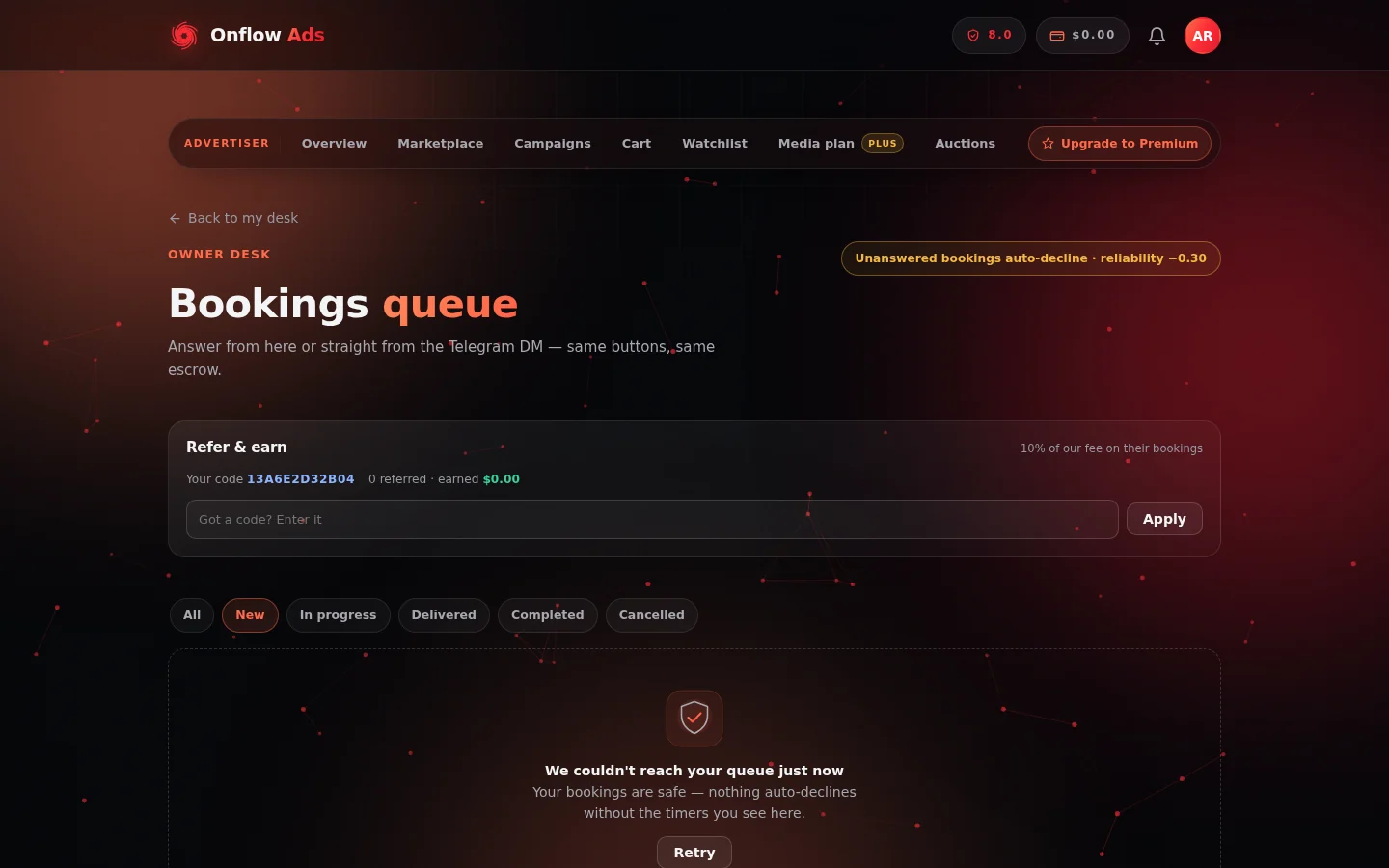
The bookings queue. The tab strip is the whole seller workflow left to right, the page opens on New, and the reminder in the corner is the one rule worth memorising.
The queue
Six tabs, each with a live count: All, New, In progress, Delivered, Completed, Cancelled. The page opens on New — what needs you now — and inside New the requests are ordered by urgency, so the one closest to auto-declining sits first.
| Tab | What is in it |
|---|---|
| New | Requests awaiting your answer, with a countdown each |
| In progress | Accepted, not yet posted — your delivery obligations |
| Delivered | Posted and proven; payouts scheduled or claimable |
| Completed | Paid out and finished |
| Cancelled | Declined, expired, refunded or cancelled bookings, plus a breakdown of your decline reasons |
Above the tabs sit three panels that follow you everywhere in the queue: the Payouts panel (see Escrow and getting paid), a verification card when identity verification is needed (see Identity verification), and the Refer & earn card (see Refer and earn).
Every new request must be answered within 24 hours. Each card shows a live countdown, and the page header carries a standing reminder: "Unanswered bookings auto-decline · reliability −0.30". A request nobody answers auto-declines, refunds the advertiser in full, and docks your reliability by 0.30 for ghosting. The advertiser's money is already held in escrow while they wait — answer promptly. Declining costs nothing; only silence does.
What a request shows you
Each booking card carries everything the decision needs:
- The advertiser — their name, with their email masked for privacy — and, when other owners have rated them, their star rating and review count as an advertiser. A track record before you commit.
- The slot, the schedule and the channel — the format label, the scheduled date and time, and which of your channels it is for.
- A snippet of the actual ad creative, quoted, so you can judge the content at a glance.
- "you receive $X after N% fee" — your exact payout and the commission rate applied to this booking. This number is fixed; it is what you will be paid.
- The countdown to auto-decline.
- On high-value bookings, a shield notice: "High-value booking — accepting stakes a refundable $X good-faith deposit from your wallet, returned on clean delivery."
Accepting
Press Accept booking. Two things happen together, as one step that either fully succeeds or does not happen at all:
- The good-faith deposit is staked, if this booking asks for one — a percentage of the booking value, capped, with the exact dollar amount shown on the card before you accept. Small bookings ask for nothing.
- The booking moves to In progress and the advertiser is notified ("Your placement was accepted").
The confirmation tells you which delivery route you are on. With auto-post on for the booking: "Accepted — we'll publish and pin it for you on [date and time] UTC. Nothing else to do." When a deposit was taken it is spelled out too: "A refundable $X good-faith deposit is held from your wallet and comes straight back when you deliver."
The good-faith deposit
- It is refundable. It comes back to your wallet as its own line when you deliver cleanly, and it comes back if the advertiser cancels.
- It must come from real, withdrawable funds. Promotional credit does not count. If your withdrawable balance is short, the accept is refused with the exact shortfall named and a top-up prompt, and the booking simply stays pending — you are never charged for an accept that did not happen.
- It is forfeited to the advertiser, not to Onflow Ads, only when a failure is your fault: you accepted and never posted, or the post came down early. The injured party is the one whose campaign window was destroyed.
- If a booking goes unposted because of a platform or Telegram failure rather than anything you did, the deposit is returned and your reliability is untouched.
Before you can accept
- Your reliability must be at least 4.0 out of 10. Below that the button refuses with "Your reliability is X/10 — you need at least 4/10 to accept bookings."
- Your account must not be under an active fraud review. During a review you cannot take on new counterparties, though you can still finish work already in flight.
Countering the price
If the offer is below your rate, do not decline it — counter it.
- Press Counter.
- Type the price you would accept in the Counter at $ box. It must be at least $1, and at most 5 times the original price (a guard against a mistyped counter).
- Press Send counter. The card then reads "Counter sent · $X — Awaiting the advertiser's answer."
While a counter is pending:
- The booking stays pending and its 24-hour clock keeps running.
- Your payout scales with the new price at the same commission ratio, so the fee percentage does not change.
- The advertiser is notified and can accept or decline.
The two outcomes:
- They accept — the difference is charged or refunded on their side and the booking confirms. If it confirms straight to accepted, your good-faith deposit is staked exactly as on a normal accept.
- They decline — the original request returns to your queue at the original price, still yours to accept or decline.
Countering is free and costs no reliability either way.
Declining
Press Decline, and the card asks "Why decline?" with six one-tap reasons:
- Off-topic for my audience
- Slot already taken
- Content not a fit
- Timing doesn't work
- Below my rate
- Against channel policy
Pick one and the decline lands immediately. The advertiser is refunded in full on the spot and told the reason ("A booking was declined & refunded"). Press cancel if you opened the reasons by mistake.
Declining a pending request never costs reliability. Only ignoring one does.
On the Cancelled tab, a "Why bookings were declined" summary groups your reasons with counts, so you can spot patterns — a pile of "Below my rate" says raise nothing and wait; a pile of "Off-topic" says your category or audience description may be steering the wrong buyers to you.
Bulk actions
In the New tab, tick the checkbox on the cards you want and a sticky bar appears with the count selected:
- Accept all — runs the same accept, one booking at a time. Every accept still stakes its own deposit and each is checked against the reliability floor.
- Decline all — asks for one shared reason, then declines each and refunds each advertiser.
- Clear — deselects everything.
When the run finishes you get a tally, including anything that could not be processed (typically an accept whose deposit your wallet could not cover). Bulk actions are the same money path as the single buttons — there are no shortcuts hiding inside them.
Answering from Telegram
When your Telegram account is linked, every new request also arrives as a bot message showing the channel, the slot, your payout, the go-live window and a preview of the ad. The buttons do exactly what the website buttons do — same escrow, same deposit, same refunds:
- Accept — identical to the dashboard action, using your listing's saved auto-post default.
- Decline — refunds the advertiser immediately, recorded as declined from Telegram.
- Snooze — pushes the auto-decline deadline out by 6 hours, at most twice per booking. The reply tells you the new deadline. After two snoozes you get "You've snoozed this twice already — the advertiser has money held waiting on an answer. Accept or decline it now."
- View Advertisement Now — the bot sends you the full ad creative, text and media, right in the chat, so you can judge the content before deciding.
Decide on the website and the Telegram card updates too: its buttons are stripped and a one-line status is posted under it, so you never act twice on the same booking. A card acted on after the fact answers plainly, for example "That request was already handled — it's now accepted."
These buttons are personal. They only work from the Telegram account linked to your Onflow Ads account, so a forwarded message cannot be used by anyone else.
Rating advertisers
Once an ad has run, the booking card offers Rate this advertiser — 1 to 5 stars, once per booking. Your ratings build the advertiser reputation other owners see on future requests, the same courtesy their reviews give your channel. Once submitted the card shows "You rated this advertiser" and cannot be changed.
The activity feed
https://onflowads.com/telegram/dashboard/paid-promotion/activity is your running feed of booking requests, payouts, feedback and disputes. Unread items are highlighted; Mark all read clears them, and Notification settings controls how events reach you — in-app, email, Telegram.
After you accept
Accepting is a promise with a date on it. What happens next is covered by:
- Posting the ad — the posting window, auto-post versus posting by hand, and what you must keep true while the ad runs.
- Submitting proof of delivery — the live-post link, Mark posted, and everything that starts the moment a booking is marked delivered.
- Escrow and getting paid — when the money is released and how to claim it.
Statuses at a glance
| Card state | What it means |
|---|---|
| Countdown pill plus Accept booking / Counter / Decline | Pending — yours to answer, clock running |
| "Counter sent · $X" | Your counter is with the advertiser; the booking is still pending |
| "Accepted — scheduled" with auto-post ON | The bot will publish and pin it for you |
| "Accepted — post it yourself, then paste the live message link" | Manual delivery, with the window and Mark posted on the card |
| "Delivered — funds release on ..." | Proof accepted; the release date shown was fixed at delivery |
| "Delivery verified — the hold has cleared." with Claim $X payout | The money is claimable |
| "Paid out · $X" | Completed and credited to your wallet |
| "Declined · [reason]" / "Cancelled" / "Refunded" | Closed; "The advertiser was refunded instantly and told why." |
FAQ
What happens if I just ignore a request?
After 24 hours it auto-declines: the advertiser is refunded in full and your reliability drops by 0.30. Declining by hand is free. If you need more time and your Telegram is linked, Snooze buys 6 more hours, up to twice.
The Accept button says I need to top up my wallet.
The booking is high-value and asks for a refundable good-faith deposit your withdrawable balance cannot cover. Top up (or wait for pending payouts to clear), then accept. The deposit must come from real funds — promotional credit does not count — and it comes straight back when you deliver.
The advertiser cancelled after I accepted. Do I get anything?
Yes. If an advertiser cancels a booking you had already accepted, before it went live, you are paid a late-cancellation compensation fee — a share of the booking price, with the exact amount shown in the notification — and your good-faith deposit is returned. You did nothing wrong, and your reliability is untouched. A booking cancelled while still pending simply disappears with no effect on you.
Can I accept a booking and then change my mind?
Not by unwinding it yourself — an accepted booking is a commitment, and letting its window lapse costs you 1.00 reliability and, on deposit-backed bookings, the deposit. If something genuinely changes, contact the advertiser and support early rather than letting the window expire.
Can I see the whole ad before deciding?
Yes. The card shows a snippet; from Telegram, View Advertisement Now sends you the complete creative, text and media, before you answer.
Why did a booking never reach me at all?
It was stopped by one of your own rules: a prohibited topic, a blackout date, a day at its cap, or a start time inside your lead time. See Managing your availability.
Next: Posting the ad — an accepted booking is a promise with a date on it; here is how to keep it.