The contact form
The contact page at https://onflowads.com/contact is the classic "write to us" route: a short form, an email reply, no account required. It's the right choice for longer enquiries, partnerships and press — and it's the reliable fallback whenever the Get help widget isn't available.
Everything sent here reaches the same team as the widget, and every reply comes by email.
When to use the contact form
Good fits
- A longer question that suits an email exchange.
- Partnership, press or business enquiries.
- An Ultimate plan application.
- You can't see the help widget, or you prefer not to use it.
- You're not signed in and don't want to be.
Better handled elsewhere
- A general "how does this work?" question — try Getting an instant answer first.
- A problem with one Boost order — use the order flow so the details are attached for you.
- "Is the site down?" — check the status page first.
Step by step
The page is headed Let us talk. The form itself sits on the left — Name, Email, Subject (optional) and Message, with the send button underneath — and a panel on the right lists the other ways to reach the team.
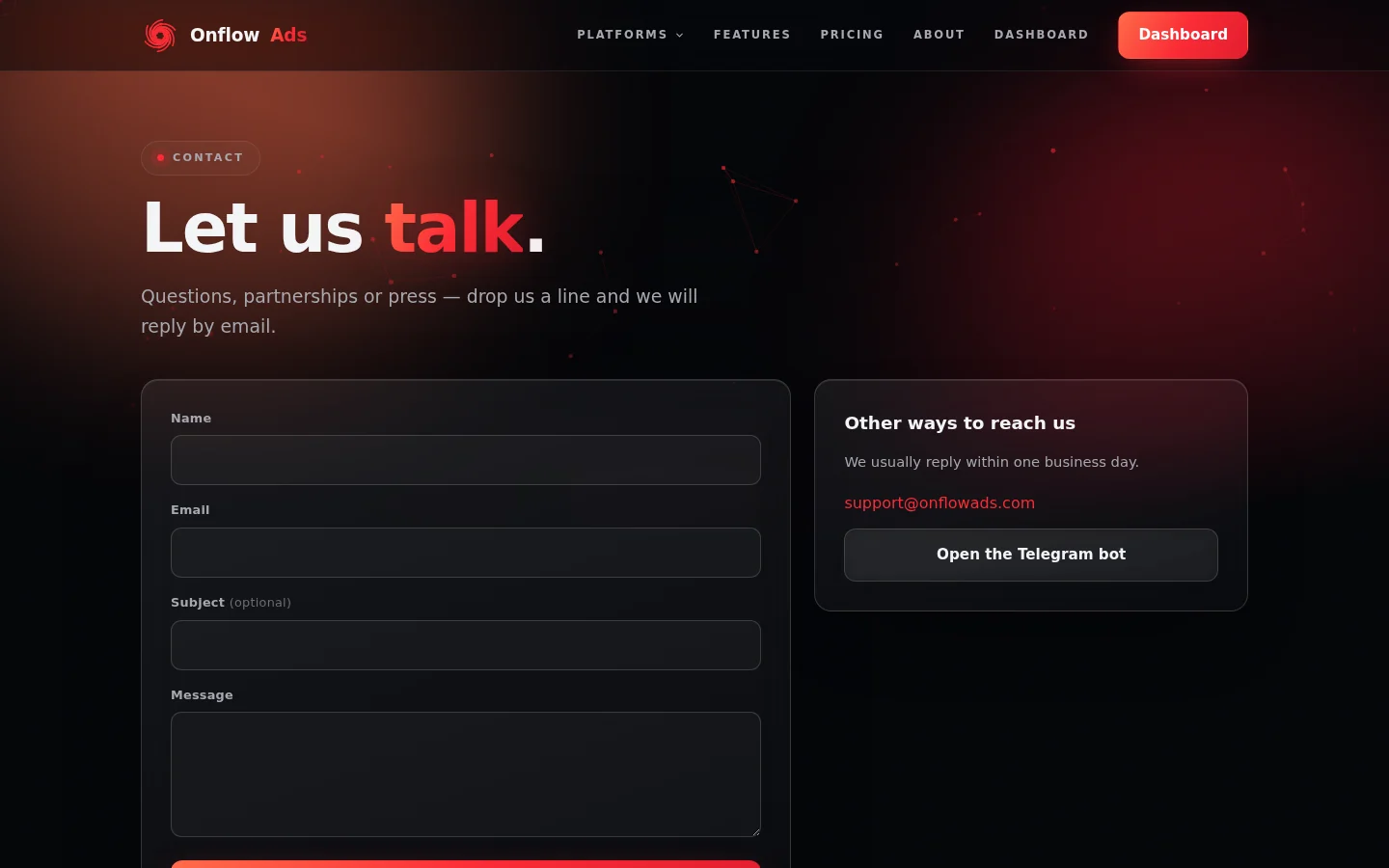
The contact page. Four fields on the left, alternatives on the right — including the line "We usually reply within one business day."
-
Go to https://onflowads.com/contact. No sign-in is needed.
-
Fill in the form on the left:
Field Required? Notes and limits Name Required Up to 200 characters. Email Required The address the reply is sent to. Check it carefully. Subject (optional) Optional Up to 120 characters. A clear subject speeds up routing. Message Required Up to about five thousand characters — noticeably more room than the widget's message box. -
Complete the verification challenge if one is shown. This is a quick anti-spam check, usually a single checkbox, and it appears above the send button when it's switched on.
-
Click Send message. The button is disabled and the status line reads "Sending..." while it goes.
-
On success the status line turns green and reads: "Thanks for reaching out — we'll reply by email soon." The form clears itself, ready for another message if you need one.
Say who you are, what you're trying to do, what happened instead, and paste any reference you have (an invoice number, an order reference, a channel username, the exact error text). One complete message beats four short ones.
Other ways to reach us, on the same page
The panel to the right of the form lists the alternatives, and states the general expectation:
"We usually reply within one business day."
- support@onflowads.com — write from your own inbox at any time.
- Open the Telegram bot — a button that opens the official Onflow Ads bot at https://t.me/OnflowAdsBot in Telegram.
The bot runs the product features documented in the Telegram bot section. Support conversations happen through this form, the help widget, or the support email address.
Messages you might see
| Message | What it means and what to do |
|---|---|
| Please fill in your name, email and message. | One of the three required fields is empty. Only the subject is optional. |
| Please enter your name. | The name field was rejected — check it isn't blank or excessively long. |
| Please enter a valid email address. | The address is malformed. Fix the typo; the reply can't reach you otherwise. |
| Please include a short message so we know how to help. | The message was empty or longer than the allowed length. |
| Please complete the verification challenge and try again. | The anti-spam check didn't pass. Reload the page, complete the challenge and resubmit. |
| Too many attempts. Please wait a minute and try again. | The form is rate-limited. Wait a little and resend — nothing already sent is lost. |
| This feature is temporarily unavailable. Please try again shortly. | A temporary service problem. Check the status page, then retry or email support@onflowads.com. |
| Something went wrong. Please try again. / Network error — please try again. | The request didn't complete. Press Send message again. |
What happens after you send
- Your enquiry is stored and the team is notified straight away.
- A person reads it and replies to the email address you entered.
- The stated turnaround on the page is usually within one business day.
Rules and limits
| Rule | Detail |
|---|---|
| No account needed | The form works signed in or signed out, and doesn't create an account. |
| No reference code | Unlike a widget ticket, the contact form doesn't give you an of_ code — the reply email is your thread. |
| Not visible in the widget | Contact-form enquiries don't appear under Your messages in the help widget. |
| No instant AI reply | The OnFlow AI first reply applies only to widget tickets. |
| No attachments | Paste error text and links into the message body. |
| Rate limited | Submissions are limited per visitor to prevent abuse. |
| Nothing is auto-filled | Even when you're signed in, type the address you actually want the reply sent to. |
Edge cases
I never got a reply. Check spam or junk and mark the message as "not spam". Then double-check the address you typed — a typo there is the most common cause. Resend from the correct address, or write directly to support@onflowads.com.
I need to add something to a message I already sent. Just send another one with the same subject, and say it's a follow-up. Or reply to the team's email once they've answered — that keeps everything in one thread.
The verification challenge won't complete. Reload the page and try again. If your browser blocks third-party scripts or you're on a restricted network, use support@onflowads.com instead.
The form is unreachable because the site is in maintenance. Email support@onflowads.com — that address is printed on the maintenance page itself. See Maintenance windows.
FAQ
Is the contact form slower than the widget? Not inherently. The widget can be faster when the team is online and shows availability up front, and it gives you a reference code and a conversation view. The contact form is plain email, and email is perfectly fine for anything that isn't urgent.
Can I use the contact form to apply for the Ultimate plan? Yes — that's the documented route. See Applying for Ultimate.
Is my message private? It goes to the Onflow Ads support team only. Handling of personal data is covered by the privacy policy at https://onflowads.com/privacy.
Next: if you're signed in, there's a second front door to the same routes — The Support page in your dashboard.