Using the Mini App
The Onflow Ads Mini App is the full website, opened inside Telegram. Same dashboard, same wallet, same campaigns, same support desk — but signed in automatically from your Telegram identity, painted in your Telegram theme, and driven by Telegram's own back button.
This page covers opening it and how it behaves. For a page-by-page tour of everything you can reach inside it, see Mini App Pages.
A Mini App is a web page that opens inside Telegram itself, in a panel over the chat, rather than in your phone's browser. Telegram passes the page a signed proof of who you are, which is what lets Onflow Ads sign you in with no password and no code.
Three ways in
| Route | How | Where you land |
|---|---|---|
| The menu button | In your chat with the Onflow Ads bot, tap Open Site next to the message box. | Your Onflow Ads launchpad, from which you pick Telegram to reach the Telegram dashboard. |
| A button on a bot message | Almost every DM carries one — Open Wallet, Contact Support, Review & respond, Manage channel, View Campaign, My Account, View Plans, Open Live Dashboard. | The exact page the message is about. |
| The redirect card | Send the bot any message; it replies with an Open Onflow Ads button. | Your dashboard. |
While the page loads you briefly see "Opening Onflow Ads…" with a spinner, then land on the destination already signed in.
Coming in through Open Site lands you on your launchpad — the platform picker that everything else hangs off:
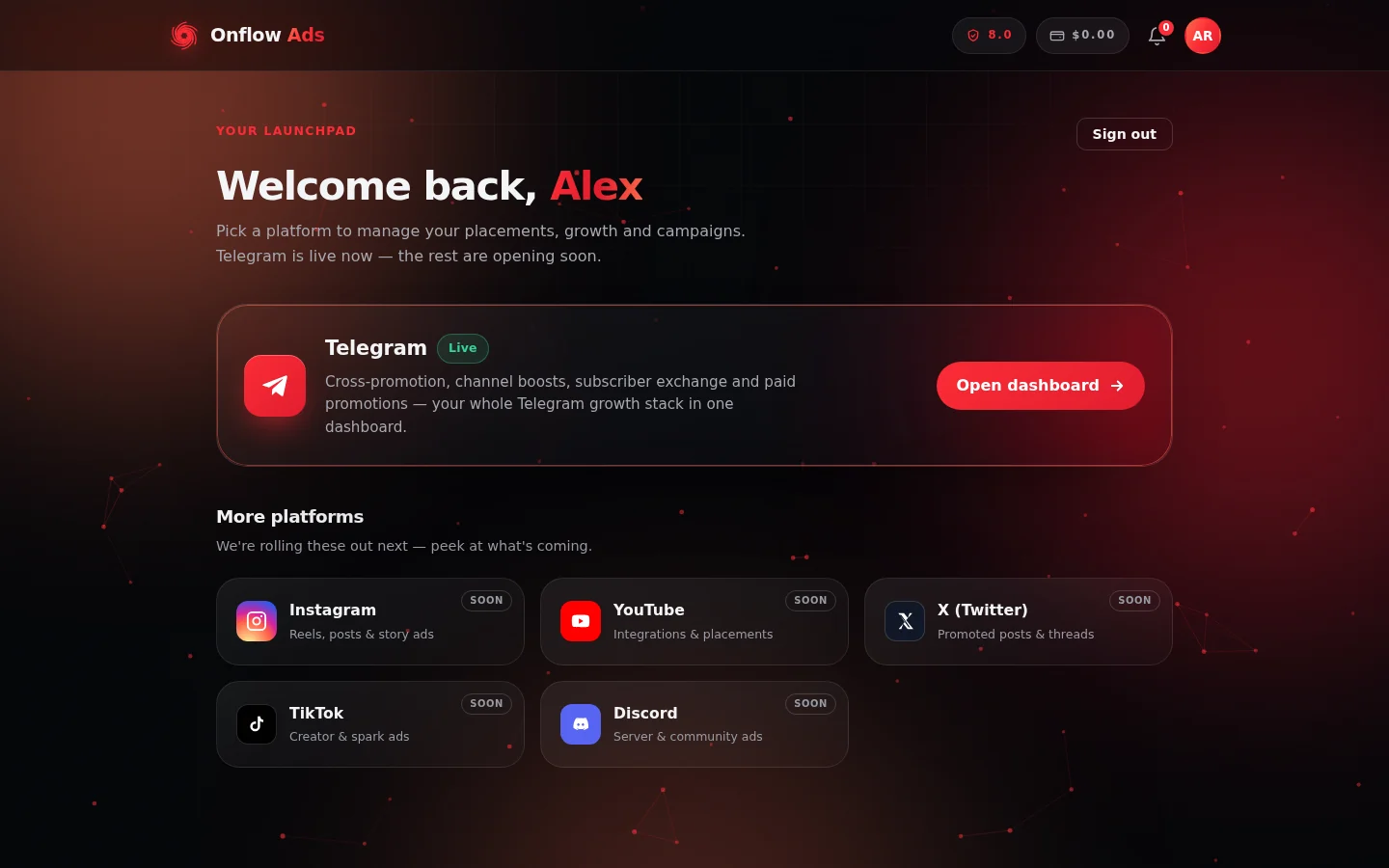
The launchpad, where the bot's Open Site button drops you. Tap Open dashboard on the Telegram card to reach everything in this guide; the other platforms are marked Soon.
How automatic sign-in works
- Telegram hands the page a cryptographically signed statement of who you are.
- Onflow Ads verifies that signature against the real bot, so it cannot be forged or replayed.
- It resolves the matching account and issues you a normal website session — the same kind of session a browser sign-in gives you.
- You are dropped on the page you asked for.
Which account you land on follows three simple rules:
| Your situation | What happens |
|---|---|
| You are already signed in in that browser context to a website account | Your website account wins. If your Telegram was sitting on a separate starter account, that starter account is folded into your website account — balance, boost credit, channels, orders and history combined — and the Telegram link moves across. |
| Your Telegram is already linked to an Onflow Ads account | You are signed in to that account. |
| Your Telegram has never been used with Onflow Ads | A fresh Telegram-native account is created on the spot, so you are never stopped at a sign-up wall. You can add a real email later from onflowads.com/account. |
If your Telegram is connected to your website account, the Mini App and the browser are the same account throughout: one wallet, one order history, one set of channels. An order you place in Telegram appears on the website tagged via Bot, and an order you place in the browser is visible in the Mini App.
Native touches
Inside Telegram the pages behave like part of the app rather than a website in a frame:
- Back button — Telegram's own back button steps back through your page history; at the first page it closes the Mini App.
- Theme — the pages follow your Telegram light or dark theme and its colours, including the header and background, and re-paint immediately if you change theme while the app is open.
- Full height — the app expands to fill the panel, and the layout tracks the panel's height as it changes.
- Haptics — buttons give a light tactile tap on supported devices.
- No accidental close — swipe-down-to-close is disabled where supported, so you cannot lose a half-filled form by scrolling too enthusiastically.
- External links — links pointing off Onflow Ads open through Telegram properly instead of a dead in-app tab.
- Less clutter — website chrome that makes no sense inside Telegram, such as cookie and consent banners, is hidden.
None of this is switched on in a normal browser. The very same pages behave like an ordinary website when you open them outside Telegram.
If automatic sign-in fails
Rather than dropping you on a sign-up wall, the launcher tells you what happened and always gives you a way forward.
| Message | What it means | What to do |
|---|---|---|
| "Telegram couldn't verify this session." | The signed identity check did not pass — often a very old Telegram client, or a stale panel left open for a long time. | Close the Mini App fully and reopen it from the bot. Update Telegram if it keeps happening. |
| "Automatic sign-in isn't configured on the site yet." | Telegram auto sign-in is temporarily unavailable. | Try again later, or use the website in a browser. |
| "Couldn't sign you in automatically." | A transient problem. | Close and reopen the Mini App. |
Each of these also offers a Continue anyway link. Following it loads the page as a normal browser visit, where you can sign in by hand if the page requires it.
If you open a Mini App page while not in Telegram at all — for example by pasting the link into a browser — the page simply behaves as an ordinary website page and applies its normal sign-in rules.
Rules, limits and things to know
- Anything you can do on the website, you can do here. The Mini App is the website; there is no reduced feature set. A handful of tasks naturally live outside Telegram, such as reading the emails we send you.
- Verified account required for the dashboards. Mini App pages under your dashboard need a signed-in, verified account. Telegram-native accounts count as verified from birth, because Telegram has already proven the identity.
- Sessions are shared per surface. A session created in the Mini App belongs to Telegram's in-app browser; a session in your phone's browser is separate. Both point at the same account.
- Caching. Telegram's in-app browser caches aggressively. If a page looks out of date, close the Mini App completely and reopen it from the bot.
- Payments and withdrawals run through the website's wallet, which the Mini App opens like any other page. The bot itself never handles money.
Short FAQ
Do I need to sign in every time I open the Mini App?
No. Each open re-establishes your session from your Telegram identity automatically.
I opened the Mini App and it created a new account. Why?
Your Telegram was not linked to any Onflow Ads account, so one was created for you. To merge it into the account you actually use, sign in to that account in your browser and then open the Mini App again — see Connecting Your Telegram.
Can I use the Mini App on desktop Telegram?
Yes. It runs anywhere Telegram supports Mini Apps. Older clients that cannot produce a signed session fall back to the Continue anyway path.
The back button closed the whole app.
That is expected at the first page of your history — Telegram's back button closes the Mini App when there is nothing left to go back to. Reopen it from Open Site.
Where is the list of everything I can open?
Mini App Pages walks through every page, what it is for, and how to reach it.
Next: Mini App Pages — the page-by-page map of everything the Mini App can open.